
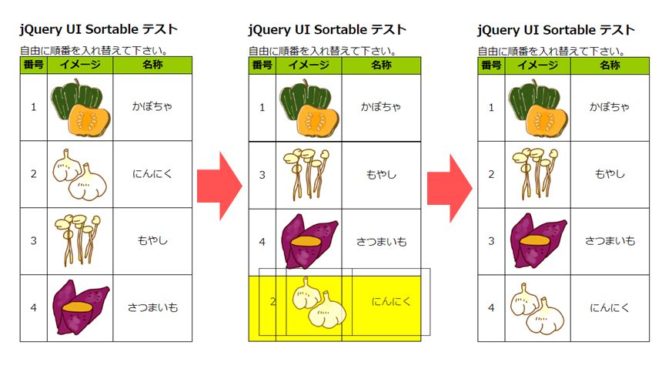
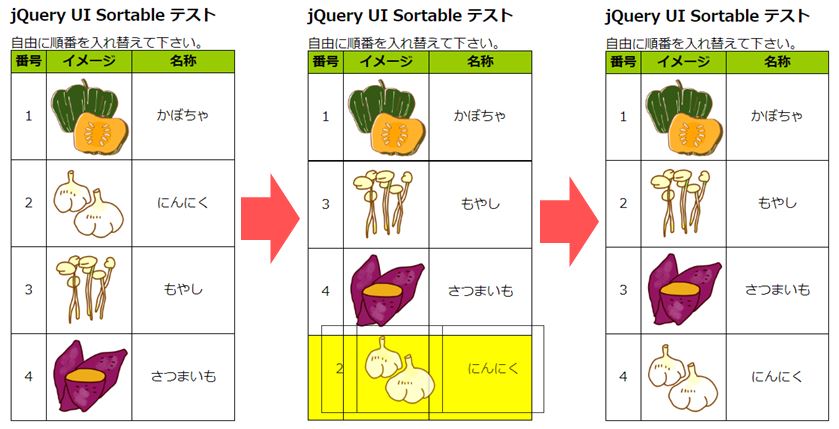
| イメージ要素の並べ替え |
今回は先回確認したプログラムを少し修正して、イメージ要素の並べ替えを行ってみます。
| マウスでは動きますが、後日 アンドロイドスマホ,Windowsタブレットタッチ操作では動かないことを確認しました。 ⇒ アンドロイドスマホは、‘jquery.ui.touch-punch.min.js’ を追加することで動作を確認できました。 |
(1)jQuery UI‐Sortable イメージ要素並べ替え①(デモリンク)
テーブルにイメージ要素を組み込んで並び替えを行います。基本的に先回作成プログラムと同様ですので説明は省略します。
(→デモへのリンク)
<!doctype html>
<html lang="ja">
<head>
  <meta charset="utf-8">
  <meta name="viewport" content="width=device-width, initial-scale=1">
  <title>jQuery UI Sortable</title>

  <style>
    body {line-height: 100%; }
    table { border : solid 1px #000000 ; border-collapse: collapse; }
    th,td { border : solid 1px #000000 ; height : 100px ; text-align:center; }
    th { background-color: #99cc00 ; height : 25px ;}

    .ui-state-highlight { background-color: #ffff00; height:16px; }
    .dsp_no{ width:40px; }
    .itm_nm{ width:90px; }
    .dscrpt{ width:120px; }

  </style>

  <script type="text/javascript" src="./js/jquery-3.3.1.min.js"></script>
  <script type="text/javascript" src="./js/jquery-ui-1.12.1/jquery-ui.min.js"></script>
  <script>
    $( function() {
      	$( "#sortable" ).sortable({
		revert: true,
      		cursor: 'move',
        	opacity: 0.8,
        	placeholder: 'ui-state-highlight'
      	});

      	$( "#sortable" ).disableSelection();

      	$('#sortable').on('sortstop', function (e, ui) {
    		// ソートが完了したら実行される。
    		var rows = $('#sortable .dsp_no');
    		for (var i = 0, rowTotal = rows.length; rowTotal > i ; i += 1) {
        		$($('.dsp_no')[i]).text(i + 1);
    		}
      	});

    } );

  </script>
</head>

<body>

<h3>jQuery UI Sortable テスト</h3>
<p1>自由に順番を入れ替えて下さい。</p1>

<table>
    <thead>
        <tr>
            <th>番号</th>
            <th>イメージ</th>
            <th>名称</th>
        </tr>
    </thead>
    <tbody id="sortable">
        <tr>
            <td class="dsp_no">1</td>
            <td class="itm_nm"><img src="./img_vegetables/001_かぼちゃ.png" alt="ERR" width="100" height="100" border="0"></td>
            <td class="dscrpt">かぼちゃ</td>
        </tr>
        <tr>
            <td class="dsp_no">2</td>
            <td class="itm_nm"><img src="./img_vegetables/002_にんにく.png" alt="ERR" width="100" height="100" border="0"></td>
            <td class="dscrpt">にんにく</td>
        </tr>
        <tr>
            <td class="dsp_no">3</td>
            <td class="itm_nm"><img src="./img_vegetables/003_もやし.png" alt="ERR" width="100" height="100" border="0"></td>
            <td class="dscrpt">もやし</td>
        </tr>
        <tr>
            <td class="dsp_no">4</td>
            <td class="itm_nm"><img src="./img_vegetables/004_さつまいも.png" alt="ERR" width="100" height="100" border="0"></td>
            <td class="dscrpt">さつまいも</td>
        </tr>
    </tbody>
</table>

</body>
</html>
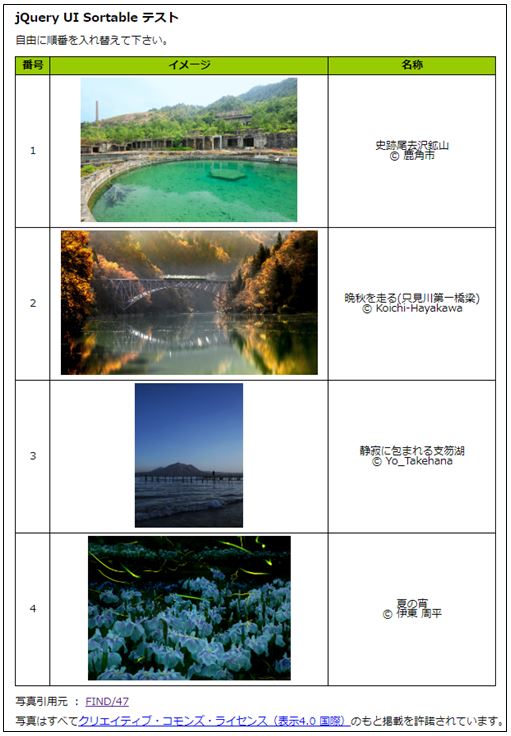
参考までに、元のサイズが大きい画像(解像度:3508X2503等)を呼び出した場合の影響も確認してみました。最初の呼び出し時間は掛かりますが、並び替え自体への影響は感じませんでした。結論としては、最初の呼び出し時間が掛かるので、圧縮したものを使うのが良いと思います。(→デモへのリンク)
(2)jQuery UI‐Sortable イメージ要素並べ替え②(デモリンク)
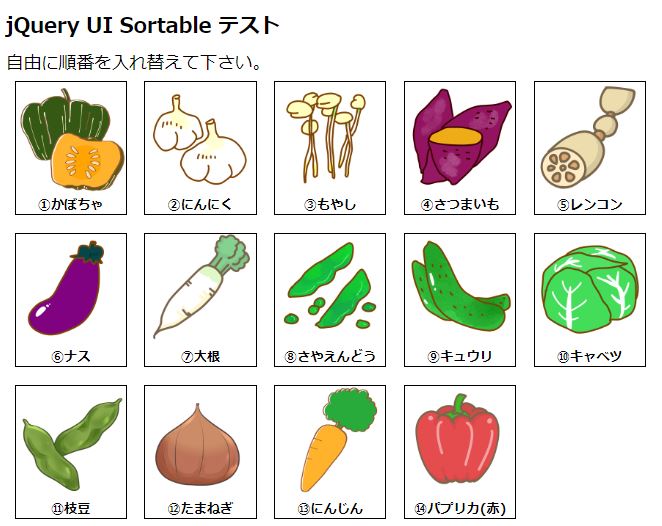
格子状リストに画像を組み込んで並び替えを行います。こちらもプログラムの説明は省略します。(→デモへのリンク)
<!doctype html>
<html lang="ja">
<head>
  <meta charset="utf-8">
  <meta name="viewport" content="width=device-width, initial-scale=1">
  <title>jQuery UI Sortable</title>

  <style>
    body {line-height: 100%;}
    #sortable { margin: 0; padding: 0; width: 600px; }
    .ui-state-default { float: left; margin: 8px; padding:0px; font-size: 12px; font-weight:bold;
		width: 100px; height: 120px; text-align: center; border:solid 1px #000000; }

    .ui-state-highlight { background-color: #ffff00; }

  </style>

  <script type="text/javascript" src="./js/jquery-3.3.1.min.js"></script>
  <script type="text/javascript" src="./js/jquery-ui-1.12.1/jquery-ui.min.js"></script>
  <script>
    $( function() {
      $( "#sortable" ).sortable({ revert: true });
      $( "#sortable" ).disableSelection();
      } );
  </script>
</head>

<body>

<h3>jQuery UI Sortable テスト</h3>
<p1>自由に順番を入れ替えて下さい。</p1>
<div id="sortable">
  <div class="ui-state-default"><img src="./img_vegetables/001_かぼちゃ.png" alt="ERR" width="100" height="100" border="0">①かぼちゃ</div>
  <div class="ui-state-default"><img src="./img_vegetables/002_にんにく.png" alt="ERR" width="100" height="100" border="0">②にんにく</div>
  <div class="ui-state-default"><img src="./img_vegetables/003_もやし.png" alt="ERR" width="100" height="100" border="0">③もやし</div>
  <div class="ui-state-default"><img src="./img_vegetables/004_さつまいも.png" alt="ERR" width="100" height="100" border="0">④さつまいも</div>
  <div class="ui-state-default"><img src="./img_vegetables/005_レンコン.png" alt="ERR" width="100" height="100" border="0">⑤レンコン</div>
  <div class="ui-state-default"><img src="./img_vegetables/006_ナス.png" alt="ERR" width="100" height="100" border="0">⑥ナス</div>
  <div class="ui-state-default"><img src="./img_vegetables/007_大根.png" alt="ERR" width="100" height="100" border="0">⑦大根</div>
  <div class="ui-state-default"><img src="./img_vegetables/008_さやえんどう.png" alt="ERR" width="100" height="100" border="0">⑧さやえんどう</div>
  <div class="ui-state-default"><img src="./img_vegetables/009_キュウリ.png" alt="ERR" width="100" height="100" border="0">⑨キュウリ</div>
  <div class="ui-state-default"><img src="./img_vegetables/010_キャベツ.png" alt="ERR" width="100" height="100" border="0">⑩キャベツ</div>
  <div class="ui-state-default"><img src="./img_vegetables/011_枝豆.png" alt="ERR" width="100" height="100" border="0">⑪枝豆</div>
  <div class="ui-state-default"><img src="./img_vegetables/012_たまねぎ.png" alt="ERR" width="100" height="100" border="0">⑫たまねぎ</div>
  <div class="ui-state-default"><img src="./img_vegetables/013_にんじん.png" alt="ERR" width="100" height="100" border="0">⑬にんじん</div>
  <div class="ui-state-default"><img src="./img_vegetables/014_パプリカ(赤).png" alt="ERR" width="100" height="100" border="0">⑭パプリカ(赤)</div>
</div>

</body>
</html>
| リスト自動生成 |
次はリスト項目の自動生成について検討します。下の図の赤矢印(→)左側は、サーバー上の特定のフォルダに格納されている画像(jpeg)ファイル一覧です。これらのファイルを自動で認識し、下図の赤矢印(→)右側の通り並び替え出来るTABLEリストを自動生成するというものです。
◆並び替え可能イメージリスト自動生成デモ①(→リンク)
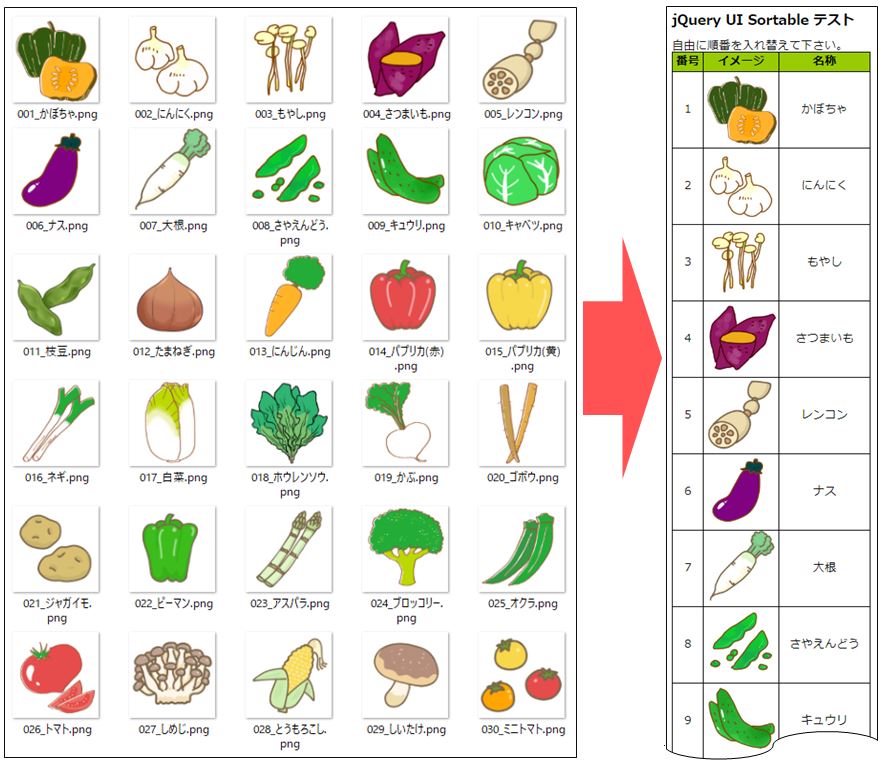
プログラム概要についてメモします。自動生成のポイントはこれまで、HTMLで直接書き込んでいたリスト項目に関する箇所を、行番56~72の通りPHPでHTMLを吐き出す様に変更しています。行番57では、対象ファイルがあるファイルパスを設定しています。‘*.png’ により、PINGファイルを対象としています。行番58では、‘glob’ 関数で対象フォルダ内の対象ファイルの全フルパスを配列に格納します。行番60~71のループ内で1ファイルづつ確認し、リスト項目1行分づつHTMLを出力しています。行番61~65では、HTML出力時に必要となるデータを各ファイル名から取得し、行番68~70で実際にHTMLを出力します。
<!doctype html>
<html lang="ja">
<head>
  <meta charset="utf-8">
  <meta name="viewport" content="width=device-width, initial-scale=1">
  <title>jQuery UI Sortable</title>

  <style>
    body {line-height: 100%; }
    table { border : solid 1px #000000 ; border-collapse: collapse; }
    th,td { border : solid 1px #000000 ; height : 100px ; text-align:center; }
    th { background-color: #99cc00 ; height : 25px ;}

    .ui-state-highlight { background-color: #ffff00; height:16px; }
    .dsp_no{ width:40px; }
    .itm_nm{ width:90px; }
    .dscrpt{ width:120px; }

  </style>

  <script type="text/javascript" src="./js/jquery-3.3.1.min.js"></script>
  <script type="text/javascript" src="./js/jquery-ui-1.12.1/jquery-ui.min.js"></script>
  <script>
    $( function() {
      	$( "#sortable" ).sortable({ placeholder: 'ui-state-highlight' });
      	$( "#sortable" ).disableSelection();

      	$('#sortable').on('sortstop', function (e, ui) {
    		// ソートが完了したら実行される。
    		var rows = $('#sortable .dsp_no');
    		for (var i = 0, rowTotal = rows.length; rowTotal > i ; i += 1) {
        		$($('.dsp_no')[i]).text(i + 1);
    		}
      	});

    } );

  </script>
</head>

<body>

<h3>jQuery UI Sortable テスト</h3>
<p1>自由に順番を入れ替えて下さい。</p1>

<table>
    <thead>
        <tr>
            <th>番号</th>
            <th>イメージ</th>
            <th>名称</th>
        </tr>
    </thead>
    <tbody id="sortable">

	<?php
	    $s_path = './img_vegetables/*.png' ;
	    $tmp_nm = glob($s_path) ;

	    for($i=0 ; $i < count($tmp_nm) ; $i++ ){
		$tfnm = basename( $tmp_nm[$i] , ".png" ) ;
		$g_f_nm[$i][0] = $tmp_nm[$i] ;				//フルパス
		$g_f_nm[$i][1] = basename( $tmp_nm[$i] ) ;		//ファイル名(拡張子含む)
		$g_f_nm[$i][2] = $tfnm ;				//ファイル名(拡張子除く)
		$g_f_nm[$i][3] = mb_substr($tfnm,4-mb_strlen($tfnm)) ;	//野菜名

		$dso_no = $i + 1 ;
		echo "<tr><td class=\"dsp_no\">".$dso_no."</td>";
            	echo "<td class=\"itm_nm\"><img src=".$g_f_nm[$i][0]." alt=".$g_f_nm[$i][3]." width=\"100\" height=\"100\" border=\"0\"></td>";
            	echo "<td class=\"dscrpt\">".$g_f_nm[$i][3]."</td></tr>";
	    }
	?>

    </tbody>
</table>

</body>
</html>
同様に並び替え可能な格子状イメージリスト自動生成プログラムを作成しました。下記よりデモ版へリンクします。
◆並び替え可能イメージリスト自動生成デモ②(→リンク)
行番34~49でPHPプログラムでHTMLを出力します。
<!doctype html>
<html lang="ja">
<head>
  <meta charset="utf-8">
  <meta name="viewport" content="width=device-width, initial-scale=1">
  <title>jQuery UI Sortable</title>

  <style>
    body {line-height: 100%;}
    #sortable { margin: 0; padding: 0; width: 600px; }
    .ui-state-default { float: left; margin: 8px; padding:0px; font-size: 12px; font-weight:bold;
		width: 100px; height: 120px; text-align: center; border:solid 1px #000000; }

    .ui-state-highlight { background-color: #ffff00; }

  </style>

  <script type="text/javascript" src="./js/jquery-3.3.1.min.js"></script>
  <script type="text/javascript" src="./js/jquery-ui-1.12.1/jquery-ui.min.js"></script>
  <script>
    $( function() {
      $( "#sortable" ).sortable({ revert: true });
      $( "#sortable" ).disableSelection();
      } );
  </script>
</head>

<body>

<h3>jQuery UI Sortable テスト</h3>
<p1>自由に順番を入れ替えて下さい。</p1>
<div id="sortable">

	<?php
	    $s_path = './img_vegetables/*.png' ;
	    $tmp_nm = glob($s_path) ;

	    for($i=0 ; $i < count($tmp_nm) ; $i++ ){
		$tfnm = basename( $tmp_nm[$i] , ".png" ) ;
		$g_f_nm[$i][0] = $tmp_nm[$i] ;				//フルパス
		$g_f_nm[$i][1] = basename( $tmp_nm[$i] ) ;		//ファイル名(拡張子含む)
		$g_f_nm[$i][2] = $tfnm ;				//ファイル名(拡張子除く)
		$g_f_nm[$i][3] = mb_substr($tfnm,4-mb_strlen($tfnm)) ;	//野菜名

		$dso_no = $i + 1 ;
		echo "<div class=\"ui-state-default\"><img src=".$g_f_nm[$i][0]." alt=".$g_f_nm[$i][3]." width=\"100\" height=\"100\" border=\"0\">".$g_f_nm[$i][3]."</div>";

	    }
	?>

</div>

</body>
</html>
| まとめ |
やるな~、“jQuery UI” by (時代に乗り遅れたおやじ)
次回は他の方が開いた時に並び替えた順序が反映される様にする為の処理,要素の追加/削除,大きい画像ファイル圧縮方法などのいずれかを検討したいと思っています。(あくまで予定)