
| 概要 |
今回はマウスを使って、2点指定によりCANVAS上に文字を書いたり,描いた絵を消去する方法について確認してみます。
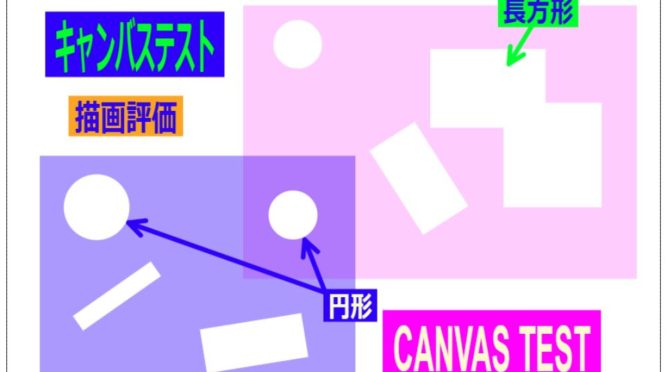
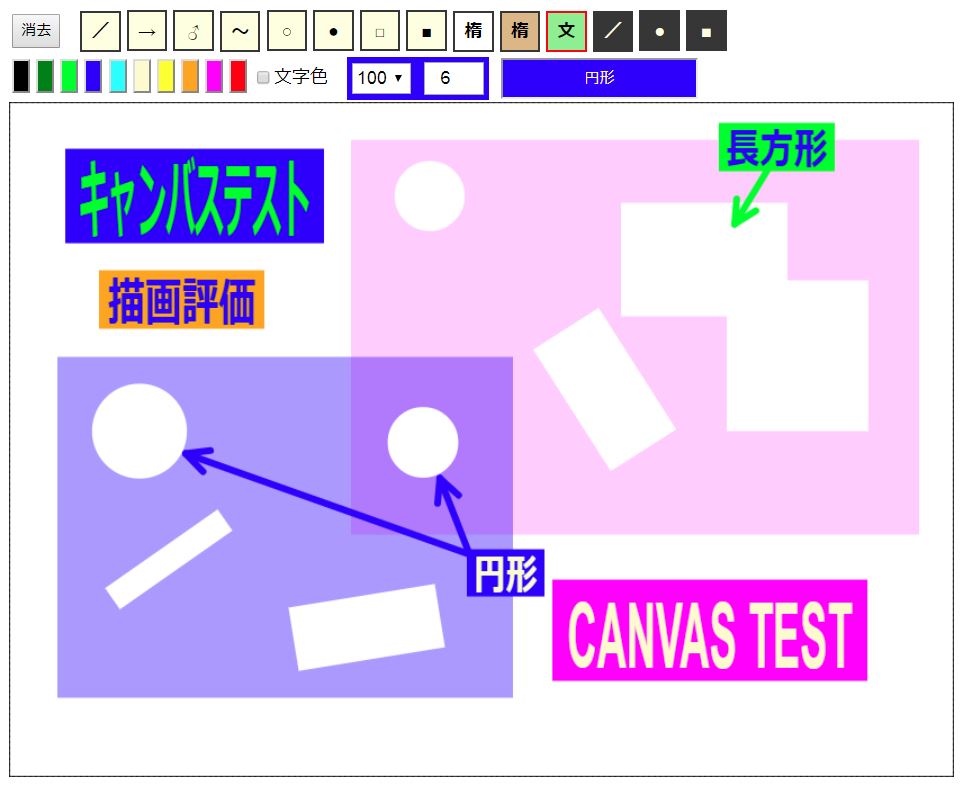
下の図が今回作成したサンプルプログラムです。
(→今回のサンプルプログラムにリンク)
 (1)文字入力
最上段の右から4つ目の“文”と書かれているボタンを選択した状態で、2段目のテキスト入力欄に文字入力し(図では“円形”と入力)、CANVAS上で対角2点を指定すると、後ろの長方形ラベルと同時にラベル内に収まる様に文字が描画されます。
通常、色ボタンをクリックすると背景色が設定され、色ボタン右隣のチェックボタンをチェック状態で色ボタンをクリックすると文字色が設定されます。
(2)描画図形の消去
最上段の右から3つのボタン(/・〇・□)は消去ボタンです。それぞれ2点選択で指定した領域を消去し、無色透明にすることができます。
| プログラムメモ |
プログラムのポイントをメモしておきます。
(1)文字入力
文字入力は下記メソッドを用います。上の fillText が塗り潰し文字で strokeText が中抜き文字です。それぞれ順に文字列,X座標,Y座標,最大幅を指定できます。色等の設定は線、長方形等と同じ様に、strokeStyle,fillStyle,globalAlphaなどを使って行います。最大幅を指定し描画範囲をコントロール出来ます。
| 塗り潰し文字 | context . fillText(text, x, y [, maxWidth ] ) |
| 中抜き文字 | context . strokeText(text, x, y [, maxWidth ] ) |
(X,Y)座標基準は次の様に属性設定できます。今回、水平基準位置を“center”(中心)、垂直基準位置を”start”(初期値:設定不要)としています。開始位置の定義はいくつかあり、水平の“center”は明確ですが、その他は違いが判りにくいです。垂直の”alphabetic”はアルファベットのベースラインということで、小文字の“p, g, y”を除く、“a, b, c ・・・” 等の下端位置と理解しています。
| 水平方向 | context.textAlign=”center” |
| 垂直方向 | context. textBaseline =”alphabetic” (初期値) |
上記を基礎知識として、今回の文字描画のプログラムを確認してみます。定形形状の描画と基本的には同じ構成です。対角2点指定し、長方形のラベル形状描画後、上に予め設定されている文字を描画します。行番216~225で行っています。行番216では始点(y_b)と終点(y_c)の原点に近い方を(y_s)として、文字を描画する時の基準位置にしています。行番218でラベル形状を描画します。行番220は文字の描画色設定、行番221で文字フォントサイズをラベル高さの9割にし、行番222で他のフォントと併せて設定します。行番224で実際に文字を描画ます。今回は文字座標と最大幅を以下の様に設定し、文字がラベル内に収まる様にしています。
| X座標 | x_b + x_t / 2 | 始点+幅*1/2 |
| Y座標 | y_s + 0.87 * Math.abs(y_t) | 始点+高さ*0.87 |
| 最大幅 | Math.abs(x_t) – fontSize / 3 | 幅‐フォントサイズ*1/3 |
行番219でctx_edt.save(); 、行番225でctx_edt.restore() ; を実行しています。これはこの間で文字対応の描画に関連する属性変更をしていますので、一旦保存し、文字描画が終わったら元に戻す目的です。
(2)描画図形の消去 (無色透明化)
描画図形消去の プログラムは定形形状の描画のものとは、少し構成が異なります。定形形状描画の場合はマウスムーブ(移動)途中で最新の状態を描画更新し、マウスアップ時に編集用CANVAS(CVS_EDT)から、確定描画用CANVAS(CVS_DRW)に転送するというものでした。しかし、描画図形消去の場合、もともと無色透明なので転送しても何も結果は変わらないことになると考え、マウスアップ時に改めて形状と座標情報をもとに確定描画用CANVAS(CVS_DRW)に再描画することにしています。
従って、マウスムーブ(移動)途中の描画内容はあくまで消去範囲の確認用です。詳細は省略しますが、行番227~253が各指定形状に対応する確認用消去範囲の描画プログラムです。
次に実際の選択範囲の消去ですが、マウスアップイベント(行番87~91)の中で通常の定形形状の場合は関数 “CVS_Transfer() ;” を実行しCANVASデータ転送を行いますが、消去の場合は関数 “clear_shape() ;”(行番256~285)を実行します。
消去のポイントは、描画前に下記の通りデバイスコンテキストのプロパティ設定を行うことで描画領域を透明に出来ます。今回のプログラム内では行番261で設定し、その後、透明範囲を描画しています。
| ctx_drw.globalCompositeOperation = “destination-out”; |
描画後、行番283で下記の通り設定しプロパティを初期値に戻しています。
| ctx_drw.globalCompositeOperation = “source-over”; |
<!doctype html>
<html lang="ja">
<head>
    <meta charset="utf-8">
    <meta name="viewport" content="width=device-width, initial-scale=1">
    <title>DRAWING TEST</title>

    <style>
	#cvs-layer { position:relative ; }
	#cvs-layer canvas { position:absolute ; top:0 ; left:0 ; }

	input { height:30px; }
	#select-color input { width:26px; height:36px; }
	#select-shape input { padding:0; font-size:16px; font-weight:900;
		width:36px; height:36px; border-style:solid; border-width:2px; background-color:#ffffe0; }
    </style>

    <script>

	var cvs_drw ; var ctx_drw ;
	var cvs_edt ; var ctx_edt ;
	var cvs_wdt ; var cvs_hgt ;
	var x_b , y_b , x_c , y_c ;
	var f_b ;
	var selected_shape ;
	var draw_char , draw_colr ;

	function draw_begin(){
	    cvs_wdt = 840 ; cvs_hgt = 600 ;
	    cvs_drw = document.getElementById("CANVAS_DRW") ;
	    ctx_drw = cvs_drw.getContext("2d") ;
	    cvs_edt = document.getElementById("CANVAS_EDT") ;
	    ctx_edt = cvs_edt.getContext("2d") ;

	    cvs_drw.width = cvs_wdt ; cvs_drw.height = cvs_hgt ;
	    cvs_edt.width = cvs_wdt ; cvs_edt.height = cvs_hgt ;

	    cvs_edt_init() ; chng_col("#000000") ; chng_shape(3);
	    ctx_drw.strokeRect( 0 , 0 , cvs_wdt , cvs_hgt ) ;

	    cvs_edt.addEventListener( "mousedown" , mouse_dn , false ) ;
	    cvs_edt.addEventListener( "mousemove" , mouse_mv , false ) ;
	    cvs_edt.addEventListener( "mouseup", mouse_up , false ) ;
	}

	//▼▼▼▼▼▼ マウス検知 ▼▼▼▼▼▼
	function mouse_dn(event){
	    var l_thkn = 1 ; var t_rate = 1 ; var l_colr = "#333333" ;

	    var rect = event.target.getBoundingClientRect() ;
	    x_b = event.clientX-rect.left ;
	    y_b = event.clientY-rect.top ;
	    f_b = true ;
	    ctx_edt.lineJoin = "round" ; ctx_edt.lineCap = "round" ;

	    t_rate = document.getElementById("s_transparency").value/100 ;
	    l_colr = document.getElementById("select-color").style.backgroundColor ;
	    l_thkn = document.getElementById("l_thickness").value ;

	    if(selected_shape==0){ctx_edt.lineCap = "butt";}
	    if(l_thkn>6 && 3>selected_shape && selected_shape>0){ l_thkn=6 ; document.getElementById("l_thickness").value=l_thkn ; }
	    if(selected_shape==10){
		draw_char = document.getElementById("input_char").value ;
		draw_colr = document.getElementById("input_char").style.color ;
	    }

	    ctx_edt.globalAlpha = t_rate ; ctx_edt.lineWidth = l_thkn ;
	    ctx_edt.strokeStyle = l_colr ; ctx_edt.fillStyle = l_colr ;
	}


	function mouse_mv(event){
	    if(f_b){
		var rect = event.target.getBoundingClientRect() ;
		x_c = event.clientX-rect.left ;
		y_c = event.clientY-rect.top ;

		if(selected_shape==3){
		    draw_line() ; x_b = x_c ; y_b = y_c ;	// 自由線
		}else{
		    draw_shape() ;				// 定型形状
		}
	    }
	}


	function mouse_up(event){
	    f_b=false;
	    if(selected_shape==11 || selected_shape==12 || selected_shape==13){ clear_shape() ; }
	    else { CVS_Transfer() ; }
	}

	//▲▲▲▲▲▲ マウス検知 ▲▲▲▲▲▲


	// 自由線
	function draw_line(){
	    ctx_edt.beginPath() ;
	    ctx_edt.moveTo(x_b,y_b) ;
	    ctx_edt.lineTo(x_c,y_c) ;
	    ctx_edt.stroke() ;
	}

	// 定型形状
	function draw_shape(){
	    var rct_edt = cvs_edt.getBoundingClientRect() ;
	    ctx_edt.clearRect( 0, 0, rct_edt.width , rct_edt.height ) ;		// CANVASクリア
	    var x_t = x_c - x_b ; var y_t = y_c - y_b ;

	    // ◆直線・矢印・〇付矢印
	    if(selected_shape==0 || selected_shape==1 || selected_shape==2){
		if(selected_shape==0 || selected_shape==1){ line_p_p(x_b,y_b,x_c,y_c); }

		if(selected_shape==1 || selected_shape==2){
		    var arw_w=10; var arw_l=20;
		    var v_l = Math.sqrt(x_t*x_t+y_t*y_t); var x_u= x_t/v_l; var y_u= y_t/v_l;
		    var p_x1 = x_c - y_u * arw_w - x_u * arw_l; var p_y1 = y_c + x_u * arw_w - y_u * arw_l;
		    var p_x2 = x_c + y_u * arw_w - x_u * arw_l; var p_y2 = y_c - x_u * arw_w - y_u * arw_l;
		    line_p_p(x_c,y_c,p_x1,p_y1); line_p_p(x_c,y_c,p_x2,p_y2);

		    if(selected_shape==2){
			ctx_edt.fillStyle = "#ffffff" ; var arw_r=20;
			var p_x0 = x_b + x_u * arw_r ; var p_y0 = y_b + y_u * arw_r ;
			line_p_p(p_x0,p_y0,x_c,y_c);
			//ctx_edt.beginPath() ; ctx_edt.moveTo(p_x0,p_y0) ; ctx_edt.lineTo(x_c,y_c) ; ctx_edt.stroke() ;
			ctx_edt.beginPath(); ctx_edt.arc( x_b , y_b , arw_r , 0 , 2 * Math.PI , false) ; ctx_edt.fill();
			ctx_edt.beginPath(); ctx_edt.arc( x_b , y_b , arw_r , 0 , 2 * Math.PI , false) ; ctx_edt.stroke();
		    }
		}

	    // ◆真円+両端円弧(中心+頂点1ヶ所)
	    }else if(selected_shape==4 || selected_shape==5){
		var x_t_abs = Math.abs(x_t) ; var y_t_abs = Math.abs(y_t) ;
		var arc_p = [] ; var arc_r = 1;
		var arc_c_x1 = x_b; var arc_c_y1 = y_b; var arc_c_x2 = x_b; var arc_c_y2 = y_b;

		if( x_t_abs > y_t_abs ){
		    // 横軸(X軸)長い
		    arc_r = Math.ceil( y_t_abs / 2 );
		    if(y_c>y_b){ arc_c_y1 = y_b + arc_r; }else{ arc_c_y1 = y_b - arc_r; }
		    arc_c_y2 = arc_c_y1 ; arc_p[0]=0.5; arc_p[1]=1.5; arc_p[2]=-0.5; arc_p[3]=0.5;

		    if(x_c>x_b){ arc_c_x1 = x_b+arc_r; arc_c_x2 = x_c - arc_r; }
		    else{ arc_c_x1 = x_c+arc_r; arc_c_x2 = x_b - arc_r; }

		}else{
		    // 縦軸(Y軸)長い
		    arc_r = Math.ceil( x_t_abs / 2 );
		    if(x_c>x_b){ arc_c_x1 = x_b + arc_r; }else{ arc_c_x1 = x_b - arc_r; }
		    arc_c_x2 = arc_c_x1 ;
		    arc_p[0]=1; arc_p[1]=2; arc_p[2]=0; arc_p[3]=1;

		    if(y_c>y_b){ arc_c_y1 = y_b+arc_r; arc_c_y2 = y_c-arc_r; }
		    else{ arc_c_y1 = y_c+arc_r; arc_c_y2 = y_b-arc_r; }
		}

	        //ctx_edt.beginPath(); ctx_edt.moveTo(x_b,y_b) ; ctx_edt.lineTo(x_c,y_c) ; ctx_edt.stroke() ;
		ctx_edt.beginPath();
		ctx_edt.arc( arc_c_x1 , arc_c_y1 , arc_r , arc_p[0] * Math.PI , arc_p[1] * Math.PI , false) ;
		ctx_edt.arc( arc_c_x2 , arc_c_y2 , arc_r , arc_p[2] * Math.PI , arc_p[3] * Math.PI , false) ;
		ctx_edt.closePath();
		if(selected_shape==5){ ctx_edt.fill(); }else if(selected_shape==4){ ctx_edt.stroke(); }


	    // ◆参考(未使用)◆真円+両端円弧(中心+頂点1ヶ所)
	    }else if(selected_shape==904 || selected_shape==905){
		var x_t_abs = Math.abs(x_t) ; var y_t_abs = Math.abs(y_t) ;
		var arc_p = [] ; var arc_r = 1;
		var arc_c_x1 = x_b; var arc_c_y1 = y_b; var arc_c_x2 = x_b; var arc_c_y2 = y_b;

		if( x_t_abs > y_t_abs ){
		    // 横軸(X軸)長い
		    arc_r = Math.ceil( y_t_abs );

		    if(x_b>x_c){
			arc_p[0]=0.5; arc_p[1]=1.5; arc_p[2]=-0.5; arc_p[3]=0.5;
			arc_c_x1 = x_c+arc_r; arc_c_x2 = x_b - x_t - arc_r;
		    }else{
			arc_p[0]=-0.5; arc_p[1]=0.5; arc_p[2]=0.5; arc_p[3]=1.5;
			arc_c_x1 = x_c-arc_r; arc_c_x2 = x_b - x_t + arc_r;
		    }

		}else{
		    // 縦軸(Y軸)長い
		    arc_r = Math.ceil( x_t_abs );

		    if(y_b>y_c){
			arc_p[0]=1; arc_p[1]=2; arc_p[2]=0; arc_p[3]=1;
			arc_c_y1 = y_c+arc_r; arc_c_y2 = y_b - y_t - arc_r;
		    }else{
			arc_p[0]=0; arc_p[1]=1; arc_p[2]=1; arc_p[3]=2;
		        arc_c_y1 = y_c-arc_r; arc_c_y2 = y_b - y_t + arc_r;
		    }
		}

		ctx_edt.beginPath();
		ctx_edt.arc( arc_c_x1 , arc_c_y1 , arc_r , arc_p[0] * Math.PI , arc_p[1] * Math.PI , false) ;
		ctx_edt.arc( arc_c_x2 , arc_c_y2 , arc_r , arc_p[2] * Math.PI , arc_p[3] * Math.PI , false) ;
		ctx_edt.closePath();
		if(selected_shape==5){ ctx_edt.fill(); }else if(selected_shape==4){ ctx_edt.stroke(); }

	    // ◆長方形輪郭(対角2ヶ所)
	    }else if(selected_shape==6){
		ctx_edt.beginPath() ; ctx_edt.strokeRect( x_b , y_b, x_t , y_t );

	    // ◆長方形塗り潰し(対角2ヶ所)
	    }else if(selected_shape==7){
		ctx_edt.fillRect( x_b , y_b, x_t , y_t );

	    // ◆楕円(対角2ヶ所)
	    }else if(selected_shape==8 || selected_shape==9){
		draw_ellipse( x_b , y_b, x_t , y_t , selected_shape - 8 );

	    // 文字(対角2ヶ所)
	    }else if(selected_shape==10){
		var y_s = y_b; if(y_b>y_c){ y_s = y_c; }

		ctx_edt.fillRect( x_b , y_b, x_t , y_t );
		ctx_edt.save();
		ctx_edt.fillStyle = draw_colr ;
		var fontSize = 0.9 * Math.abs(y_t) ;
		ctx_edt.font = "bold " + fontSize + "px Arial, meiryo, sans-serif" ;
		ctx_edt.textAlign = "center" ;
		ctx_edt.fillText( draw_char , x_b + x_t / 2 , y_s + 0.87 * Math.abs(y_t) , Math.abs(x_t) - fontSize / 3 ) ;
		ctx_edt.restore() ;

	    // ◇消去◇(/●■)
	    }else if(selected_shape==11 || selected_shape==12 || selected_shape==13){
		ctx_edt.save() ;
		ctx_edt.strokeStyle = "#9400d3" ; ctx_edt.fillStyle = "#9400d3" ;
		ctx_edt.globalAlpha = 0.4 ;

		if(selected_shape==11){
		    ctx_edt.globalAlpha = 0.4 ; ctx_edt.lineCap = "butt"; ctx_edt.setLineDash([]);
		    line_p_p(x_b,y_b,x_c,y_c);

		}else if(selected_shape==12){
		    var x_t_abs = Math.abs(x_t) ; var y_t_abs = Math.abs(y_t) ;
		    var arc_r = Math.sqrt( Math.pow(x_t_abs,2) + Math.pow(y_t_abs,2) ) ;

		    var x_adj = arc_r ; if(x_b>x_c){ x_adj = - 1 * arc_r ; }
		    var y_adj = arc_r ; if(y_b>y_c){ y_adj = - 1 * arc_r ; }

		    ctx_edt.beginPath();
		    ctx_edt.arc( x_b , y_b , arc_r , 0 , 2 * Math.PI , false) ;
		    ctx_edt.closePath();
		    ctx_edt.fill();

		}else{
		    ctx_edt.fillRect( x_b , y_b, x_t , y_t );
		}
		ctx_edt.restore() ;
	    }
	}

	// ◇消去◇(/●■)
	function clear_shape(){
	    var rct_edt = cvs_edt.getBoundingClientRect() ;
	    ctx_edt.clearRect( 0, 0, rct_edt.width , rct_edt.height ) ;		// CANVASクリア

	    ctx_drw.globalCompositeOperation = "destination-out";

	    var x_t = x_c - x_b ; var y_t = y_c - y_b ;

	    if(selected_shape==11){
		ctx_drw.lineWidth = document.getElementById("l_thickness").value ;
		ctx_drw.beginPath() ; ctx_drw.moveTo(x_b,y_b) ; ctx_drw.lineTo(x_c,y_c) ; ctx_drw.stroke() ;

	    }else if(selected_shape==12){
		var x_t_abs = Math.abs(x_t) ; var y_t_abs = Math.abs(y_t) ;
		var arc_r = Math.sqrt( Math.pow(x_t_abs,2) + Math.pow(y_t_abs,2) ) ;

		var x_adj = arc_r ; if(x_b>x_c){ x_adj = - 1 * arc_r ; }
		var y_adj = arc_r ; if(y_b>y_c){ y_adj = - 1 * arc_r ; }

		ctx_drw.beginPath();
		ctx_drw.arc( x_b , y_b , arc_r , 0 , 2 * Math.PI , false) ;
		ctx_drw.closePath();
		ctx_drw.fill();

	    }else{ ctx_drw.fillRect( x_b , y_b, x_t , y_t ); }

	    ctx_drw.globalCompositeOperation = "source-over";

	}

	// ◆楕円(対角2ヶ所)
	function draw_ellipse( ps_x , ps_y , w , h , fff ){
	    var c_x = ps_x + w / 2 , c_y = ps_y + h / 2 ;
	    var m_x = c_x - w / 2 , s_x = c_x + w / 2 , u_y = c_y - h / 2 , e_y = c_y + h / 2 ;
	    var elp_eff = 0.551784; var x_elp = elp_eff * w / 2; var y_elp = elp_eff * h / 2;

	    ctx_edt.beginPath();
	    ctx_edt.moveTo( c_x , u_y );
	    ctx_edt.bezierCurveTo( c_x + x_elp , u_y , s_x , c_y - y_elp , s_x , c_y );
	    ctx_edt.bezierCurveTo( s_x , c_y + y_elp , c_x + x_elp , e_y , c_x , e_y );
	    ctx_edt.bezierCurveTo( c_x - x_elp , e_y , m_x , c_y + y_elp , m_x , c_y );
	    ctx_edt.bezierCurveTo( m_x , c_y - y_elp , c_x - x_elp , u_y , c_x , u_y );
	    ctx_edt.closePath();
	    if( fff==0 ){ ctx_edt.stroke(); } else { ctx_edt.fill(); }
	}

	// 2点間直線
	function line_p_p(ps_x,ps_y,pe_x,pe_y){
	    ctx_edt.beginPath() ; ctx_edt.moveTo(ps_x,ps_y) ; ctx_edt.lineTo(pe_x,pe_y) ; ctx_edt.stroke() ;
	}

	// CVS_edt 初期化
	function cvs_edt_init(){
	    ctx_edt.globalAlpha = 1 ;
	    ctx_edt.lineWidth = 1 ;
	    ctx_edt.strokeStyle = "#000000" ;
	    ctx_edt.clearRect( 0 , 0 , cvs_wdt , cvs_hgt ) ;
	    ctx_edt.strokeRect( 0 , 0 , cvs_wdt , cvs_hgt ) ;
	}

	// CVS_drw 初期化
	function cvs_drw_init(){
	    ctx_drw.globalAlpha = 1 ;
	    ctx_drw.lineWidth = 1 ;

	    ctx_drw.clearRect( 0 , 0 , cvs_wdt , cvs_hgt ) ;
	    ctx_drw.strokeRect( 0 , 0 , cvs_wdt , cvs_hgt ) ;
	}

	// 描画色変更
	function chng_col(gColor){
	    var chk = document.getElementById("s_char_color").checked ;
	    if(chk){
		document.getElementById("input_char").style.color = gColor ;
	    }else{
		ctx_edt.strokeStyle = gColor ;
		document.getElementById("select-color").style.backgroundColor = gColor ;
		document.getElementById("input_char").style.backgroundColor = gColor ;
	    }
	}

	// 描画形状変更
	function chng_shape(shp_num){
	    document.getElementById("s_char_color").checked = false ;
	    var elm_tmp = document.getElementById("select-shape") ;
	    var elm_inp = elm_tmp.getElementsByTagName("input") ;
	    for(var i=0 ; elm_inp.length > i ; ++i){
		if(i==shp_num){
		    //elm_inp[i].style.backgroundColor = "#ffd700" ;
		    elm_inp[i].style.borderColor = "#ff0000" ;
		} else {
		    //elm_inp[i].style.backgroundColor = "#d3d3d3" ;
		    elm_inp[i].style.borderColor = "#333333" ;
		}
	    }
	    selected_shape = shp_num ;
	}

	// CANVAS 転送
	function CVS_Transfer(){
	    var img_edt = new Image ;
	    img_edt.src = ctx_edt.canvas.toDataURL() ;
	    img_edt.onload = function(){
		ctx_drw.drawImage(img_edt,0,0) ;
	    	cvs_edt_init();
	    }
	}

    </script>
</head>

<body onLoad="draw_begin()">
    <TABLE><TR>
    <TD><input type="button" value="消去" id="ClearCVS" onclick="cvs_drw_init()"></TD>
    <TD style="width:10px;"></TD>
    <TD id="select-shape">
	<input type="button" value="/" onclick="chng_shape(0)">
	<input type="button" value="→" onclick="chng_shape(1)">
	<input type="button" value="♂" onclick="chng_shape(2)">
	<input type="button" value=" ~ " onclick="chng_shape(3)">

	<input type="button" value="○" onclick="chng_shape(4)">
	<input type="button" value="●" onclick="chng_shape(5)">
	<input type="button" value="□" onclick="chng_shape(6)">
	<input type="button" value="■" onclick="chng_shape(7)">
	<input type="button" value="楕" onclick="chng_shape(8)" style="background-color:#ffffff;">
	<input type="button" value="楕" onclick="chng_shape(9)" style="background-color:#deb887;">
	<input type="button" value="文" onclick="chng_shape(10)" style="background-color:#90ee90;">

	<input type="button" value="/" onclick="chng_shape(11)" style="color:#ffffe0; background-color:#333333;">
	<input type="button" value="●" onclick="chng_shape(12)" style="color:#ffffe0; background-color:#333333;">
	<input type="button" value="■" onclick="chng_shape(13)" style="color:#ffffe0; background-color:#333333;">
    </TD>
    <TD style="width:5px;"></TD>


    </TR></TABLE>

    <TABLE>
    <TD>
	<input type="button" style="background-color:#000000;" onclick="chng_col('#000000')">
	<input type="button" style="background-color:#008000;" onclick="chng_col('#008000')">
	<input type="button" style="background-color:#00ff00;" onclick="chng_col('#00ff00')">
	<input type="button" style="background-color:#0000ff;" onclick="chng_col('#0000ff')">
	<input type="button" style="background-color:#00ffff;" onclick="chng_col('#00ffff')">
	<input type="button" style="background-color:#fffacf;" onclick="chng_col('#fffacf')">
	<input type="button" style="background-color:#ffff00;" onclick="chng_col('#ffff00')">
	<input type="button" style="background-color:#ffa500;" onclick="chng_col('#ffa500')">
	<input type="button" style="background-color:#ff00ff;" onclick="chng_col('#ff00ff')">
	<input type="button" style="background-color:#ff0000;" onclick="chng_col('#ff0000')">
    </TD>
    <TD valign="bottom"><input type="checkbox" name="s_color" value="s_char" id="s_char_color" style="vertical-align:middle;">文字色</TD>
    <TD style="width:10px;"></TD>
    <TD id="select-color">
	<select id="s_transparency" style="height:28px; text-align:center; font-size:16px; margin:0 3px;">
	<option value="100">100</option><option value="80">80</option><option value="60">60</option>
	<option value="40">40</option><option value="20">20</option></select>

	<input type="number" id="l_thickness" min="1" max="500" value="3" style="height:23px; width:50px; text-align:center; font-size:16px; margin:0 3px;">
    </TD>
    <TD style="width:5px;"></TD>
    <TD>
	<input type="text" id="input_char" value="TEST" style="color:#ff0000; text-align:center;">
    </TD>
    </TR></TABLE>

    <div id="cvs-layer">
	<canvas id="CANVAS_DRW"></canvas>
	<canvas id="CANVAS_EDT"></canvas>
    </div>

</body>

</html>
| 写真用CANVASの追加 |
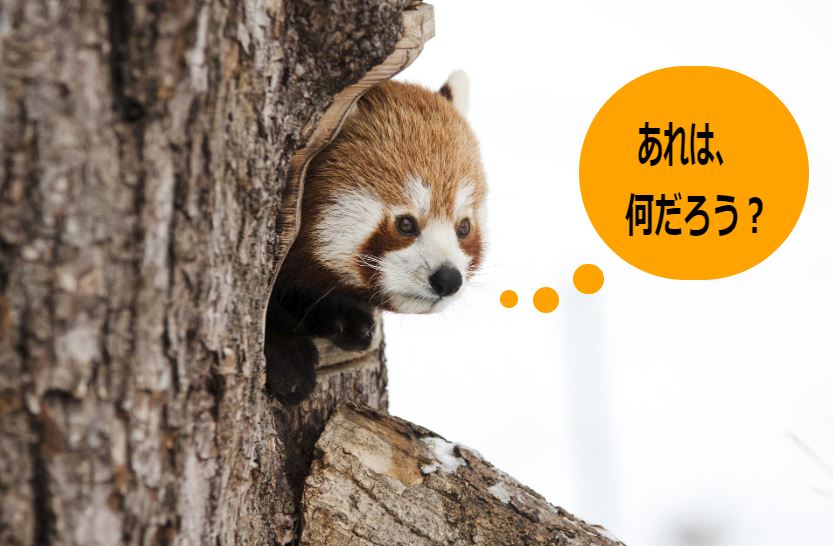
CANVASを1つ追加して、3つのCANVASの最下面に配置しました。下の図の様に追加した最下面のCANVASに写真などを読み込むことで、まるで写真上に編集している様に見えます。今回は横幅を固定し、写真の縦横比にあわせてCANVASの高さを設定する様にしています。
(→このサンプルプログラムにリンク)
念のため、プログラムコードを残しておきます。
<!doctype html>
<html lang="ja">
<head>
    <meta charset="utf-8">
    <meta name="viewport" content="width=device-width, initial-scale=1">
    <title>DRAWING TEST</title>

    <style>
	#cvs-layer { position:relative ; }
	#cvs-layer canvas { position:absolute ; top:0 ; left:0 ; }

	input { height:30px; }
	#select-color input { width:26px; height:36px; }
	#select-shape input { padding:0; font-size:16px; font-weight:900;
		width:36px; height:36px; border-style:solid; border-width:2px; background-color:#ffffe0; }
    </style>

    <script>
	var cvs_pic ; var ctx_pic ;
	var cvs_drw ; var ctx_drw ;
	var cvs_edt ; var ctx_edt ;
	var cvs_wdt ; var cvs_hgt ;
	var x_b , y_b , x_c , y_c ;
	var f_b ;
	var selected_shape ;
	var draw_char , draw_colr ;
	var sld_chk ; var tmp_pic ;

	function draw_begin(){
	    cvs_wdt = 840 ; cvs_hgt = 600 ;
	    cvs_pic = document.getElementById('CANVAS_PIC') ;
	    ctx_pic = cvs_pic.getContext("2d") ;
	    cvs_drw = document.getElementById("CANVAS_DRW") ;
	    ctx_drw = cvs_drw.getContext("2d") ;
	    cvs_edt = document.getElementById("CANVAS_EDT") ;
	    ctx_edt = cvs_edt.getContext("2d") ;

	    var image = new Image();
            image.src = "./sample.jpg" ;

	    image.onload = function () {
		var img_h = image.height ; var img_w = image.width ;

		cvs_hgt = Math.floor(img_h * cvs_wdt / img_w) ;
                cvs_pic.width = cvs_wdt ; cvs_pic.height = cvs_hgt ;
		cvs_drw.width = cvs_wdt ; cvs_drw.height = cvs_hgt ;
	    	cvs_edt.width = cvs_wdt ; cvs_edt.height = cvs_hgt ;

                ctx_pic.drawImage( image, 0 , 0 , cvs_wdt , cvs_hgt ) ;

		tmp_pic = new Image ;
		tmp_pic.src = ctx_pic.canvas.toDataURL() ;

	    	cvs_edt_init() ; chng_col("#000000") ; chng_shape(3);
	    	ctx_drw.strokeRect( 0 , 0 , cvs_wdt , cvs_hgt ) ;

	    	cvs_edt.addEventListener( "mousedown" , mouse_dn , false ) ;
	    	cvs_edt.addEventListener( "mousemove" , mouse_mv , false ) ;
	    	cvs_edt.addEventListener( "mouseup", mouse_up , false ) ;
	    }
	}


	//▼▼▼▼▼▼ マウス検知 ▼▼▼▼▼▼
	function mouse_dn(event){
	    var l_thkn = 1 ; var t_rate = 1 ; var l_colr = "#333333" ;

	    var rect = event.target.getBoundingClientRect() ;
	    x_b = event.clientX-rect.left ;
	    y_b = event.clientY-rect.top ;
	    f_b = true ;
	    ctx_edt.lineJoin = "round" ; ctx_edt.lineCap = "round" ;

	    t_rate = document.getElementById("s_transparency").value/100 ;
	    l_colr = document.getElementById("select-color").style.backgroundColor ;
	    l_thkn = document.getElementById("l_thickness").value ;

	    if(selected_shape==0){ctx_edt.lineCap = "butt";}
	    if(l_thkn>6 && 3>selected_shape && selected_shape>0){ l_thkn=6 ; document.getElementById("l_thickness").value=l_thkn ; }
	    if(selected_shape==10){
		draw_char = document.getElementById("input_char").value ;
		draw_colr = document.getElementById("input_char").style.color ;
	    }

	    ctx_edt.globalAlpha = t_rate ; ctx_edt.lineWidth = l_thkn ;
	    ctx_edt.strokeStyle = l_colr ; ctx_edt.fillStyle = l_colr ;
	}


	function mouse_mv(event){
	    if(f_b){
		var rect = event.target.getBoundingClientRect() ;
		x_c = event.clientX-rect.left ;
		y_c = event.clientY-rect.top ;

		if(selected_shape==3){
		    draw_line() ; x_b = x_c ; y_b = y_c ;	// 自由線
		}else{
		    draw_shape() ;				// 定型形状
		}
	    }
	}


	function mouse_up(event){
	    f_b=false;
	    if(selected_shape==11 || selected_shape==12 || selected_shape==13){ clear_shape() ; }
	    else { CVS_Transfer() ; }
	}

	//▲▲▲▲▲▲ マウス検知 ▲▲▲▲▲▲


	// 自由線
	function draw_line(){
	    ctx_edt.beginPath() ;
	    ctx_edt.moveTo(x_b,y_b) ;
	    ctx_edt.lineTo(x_c,y_c) ;
	    ctx_edt.stroke() ;
	}

	// 定型形状
	function draw_shape(){
	    var rct_edt = cvs_edt.getBoundingClientRect() ;
	    ctx_edt.clearRect( 0, 0, rct_edt.width , rct_edt.height ) ;		// CANVASクリア
	    var x_t = x_c - x_b ; var y_t = y_c - y_b ;

	    // ◆直線・矢印・〇付矢印
	    if(selected_shape==0 || selected_shape==1 || selected_shape==2){
		if(selected_shape==0 || selected_shape==1){ line_p_p(x_b,y_b,x_c,y_c); }

		if(selected_shape==1 || selected_shape==2){
		    // http://k-hiura.cocolog-nifty.com/blog/2010/11/post-2a62.html
		    var arw_w=10; var arw_l=20;
		    var v_l = Math.sqrt(x_t*x_t+y_t*y_t); var x_u= x_t/v_l; var y_u= y_t/v_l;
		    var p_x1 = x_c - y_u * arw_w - x_u * arw_l; var p_y1 = y_c + x_u * arw_w - y_u * arw_l;
		    var p_x2 = x_c + y_u * arw_w - x_u * arw_l; var p_y2 = y_c - x_u * arw_w - y_u * arw_l;
		    line_p_p(x_c,y_c,p_x1,p_y1); line_p_p(x_c,y_c,p_x2,p_y2);

		    if(selected_shape==2){
			ctx_edt.fillStyle = "#ffffff" ; var arw_r=20;
			var p_x0 = x_b + x_u * arw_r ; var p_y0 = y_b + y_u * arw_r ;
			line_p_p(p_x0,p_y0,x_c,y_c);
			//ctx_edt.beginPath() ; ctx_edt.moveTo(p_x0,p_y0) ; ctx_edt.lineTo(x_c,y_c) ; ctx_edt.stroke() ;
			ctx_edt.beginPath(); ctx_edt.arc( x_b , y_b , arw_r , 0 , 2 * Math.PI , false) ; ctx_edt.fill();
			ctx_edt.beginPath(); ctx_edt.arc( x_b , y_b , arw_r , 0 , 2 * Math.PI , false) ; ctx_edt.stroke();
		    }
		}

	    // ◆真円+両端円弧(中心+頂点1ヶ所)
	    }else if(selected_shape==4 || selected_shape==5){
		var x_t_abs = Math.abs(x_t) ; var y_t_abs = Math.abs(y_t) ;
		var arc_p = [] ; var arc_r = 1;
		var arc_c_x1 = x_b; var arc_c_y1 = y_b; var arc_c_x2 = x_b; var arc_c_y2 = y_b;

		if( x_t_abs > y_t_abs ){
		    // 横軸(X軸)長い
		    arc_r = Math.ceil( y_t_abs / 2 );
		    if(y_c>y_b){ arc_c_y1 = y_b + arc_r; }else{ arc_c_y1 = y_b - arc_r; }
		    arc_c_y2 = arc_c_y1 ; arc_p[0]=0.5; arc_p[1]=1.5; arc_p[2]=-0.5; arc_p[3]=0.5;

		    if(x_c>x_b){ arc_c_x1 = x_b+arc_r; arc_c_x2 = x_c - arc_r; }
		    else{ arc_c_x1 = x_c+arc_r; arc_c_x2 = x_b - arc_r; }

		}else{
		    // 縦軸(Y軸)長い
		    arc_r = Math.ceil( x_t_abs / 2 );
		    if(x_c>x_b){ arc_c_x1 = x_b + arc_r; }else{ arc_c_x1 = x_b - arc_r; }
		    arc_c_x2 = arc_c_x1 ;
		    arc_p[0]=1; arc_p[1]=2; arc_p[2]=0; arc_p[3]=1;

		    if(y_c>y_b){ arc_c_y1 = y_b+arc_r; arc_c_y2 = y_c-arc_r; }
		    else{ arc_c_y1 = y_c+arc_r; arc_c_y2 = y_b-arc_r; }
		}

	        //ctx_edt.beginPath(); ctx_edt.moveTo(x_b,y_b) ; ctx_edt.lineTo(x_c,y_c) ; ctx_edt.stroke() ;
		ctx_edt.beginPath();
		ctx_edt.arc( arc_c_x1 , arc_c_y1 , arc_r , arc_p[0] * Math.PI , arc_p[1] * Math.PI , false) ;
		ctx_edt.arc( arc_c_x2 , arc_c_y2 , arc_r , arc_p[2] * Math.PI , arc_p[3] * Math.PI , false) ;
		ctx_edt.closePath();
		if(selected_shape==5){ ctx_edt.fill(); }else if(selected_shape==4){ ctx_edt.stroke(); }


	    // ◆参考(未使用)◆真円+両端円弧(中心+頂点1ヶ所)
	    }else if(selected_shape==904 || selected_shape==905){
		var x_t_abs = Math.abs(x_t) ; var y_t_abs = Math.abs(y_t) ;
		var arc_p = [] ; var arc_r = 1;
		var arc_c_x1 = x_b; var arc_c_y1 = y_b; var arc_c_x2 = x_b; var arc_c_y2 = y_b;

		if( x_t_abs > y_t_abs ){
		    // 横軸(X軸)長い
		    arc_r = Math.ceil( y_t_abs );

		    if(x_b>x_c){
			arc_p[0]=0.5; arc_p[1]=1.5; arc_p[2]=-0.5; arc_p[3]=0.5;
			arc_c_x1 = x_c+arc_r; arc_c_x2 = x_b - x_t - arc_r;
		    }else{
			arc_p[0]=-0.5; arc_p[1]=0.5; arc_p[2]=0.5; arc_p[3]=1.5;
			arc_c_x1 = x_c-arc_r; arc_c_x2 = x_b - x_t + arc_r;
		    }

		}else{
		    // 縦軸(Y軸)長い
		    arc_r = Math.ceil( x_t_abs );

		    if(y_b>y_c){
			arc_p[0]=1; arc_p[1]=2; arc_p[2]=0; arc_p[3]=1;
			arc_c_y1 = y_c+arc_r; arc_c_y2 = y_b - y_t - arc_r;
		    }else{
			arc_p[0]=0; arc_p[1]=1; arc_p[2]=1; arc_p[3]=2;
		        arc_c_y1 = y_c-arc_r; arc_c_y2 = y_b - y_t + arc_r;
		    }
		}

	        //ctx_edt.beginPath(); ctx_edt.moveTo(x_b,y_b) ; ctx_edt.lineTo(x_c,y_c) ; ctx_edt.stroke() ;
		ctx_edt.beginPath();
		ctx_edt.arc( arc_c_x1 , arc_c_y1 , arc_r , arc_p[0] * Math.PI , arc_p[1] * Math.PI , false) ;
		ctx_edt.arc( arc_c_x2 , arc_c_y2 , arc_r , arc_p[2] * Math.PI , arc_p[3] * Math.PI , false) ;
		ctx_edt.closePath();
		if(selected_shape==5){ ctx_edt.fill(); }else if(selected_shape==4){ ctx_edt.stroke(); }

	    // ◆長方形輪郭(対角2ヶ所)
	    }else if(selected_shape==6){
		ctx_edt.beginPath() ; ctx_edt.strokeRect( x_b , y_b, x_t , y_t );

	    // ◆長方形塗り潰し(対角2ヶ所)
	    }else if(selected_shape==7){
		ctx_edt.fillRect( x_b , y_b, x_t , y_t );

	    // ◆楕円(対角2ヶ所)
	    }else if(selected_shape==8 || selected_shape==9){
		draw_ellipse( x_b , y_b, x_t , y_t , selected_shape - 8 );

	    // 文字(対角2ヶ所)
	    }else if(selected_shape==10){
		var y_s = y_b; if(y_b>y_c){ y_s = y_c; }

		ctx_edt.fillRect( x_b , y_b, x_t , y_t );
		//ctx_edt.save() ; ctx_edt.strokeStyle = "#9400d3" ;
		//ctx_edt.globalAlpha = 1 ; ctx_edt.lineWidth = 1 ; ctx_edt.setLineDash([2,3]);
		//ctx_edt.beginPath() ; ctx_edt.strokeRect( x_b , y_b, x_t , y_t );
		//ctx_edt.restore() ;
		ctx_edt.save() ;
		ctx_edt.fillStyle = draw_colr ;
		var fontSize = 0.9 * Math.abs(y_t) ;
		ctx_edt.font = "bold " + fontSize + "px Arial, meiryo, sans-serif" ;
		ctx_edt.textAlign = "center" ;
		ctx_edt.fillText( draw_char , x_b + x_t / 2 , y_s + 0.87 * Math.abs(y_t) , Math.abs(x_t) - fontSize / 3 ) ;
		ctx_edt.restore() ;

	    // ◇消去◇(/●■)
	    }else if(selected_shape==11 || selected_shape==12 || selected_shape==13){
		ctx_edt.save() ;
		ctx_edt.strokeStyle = "#9400d3" ; ctx_edt.fillStyle = "#9400d3" ;
		ctx_edt.globalAlpha = 0.4 ;

		if(selected_shape==11){
		    ctx_edt.globalAlpha = 0.4 ; ctx_edt.lineCap = "butt"; ctx_edt.setLineDash([]);
		    line_p_p(x_b,y_b,x_c,y_c);

		}else if(selected_shape==12){
		    //ctx_edt.lineWidth = 1 ;ctx_edt.setLineDash([2,3]);
		    var x_t_abs = Math.abs(x_t) ; var y_t_abs = Math.abs(y_t) ;
		    //var arc_r = x_t_abs / 2 ; if( x_t_abs > y_t_abs ){ arc_r = y_t_abs / 2 ; }

		    var arc_r = Math.sqrt( Math.pow(x_t_abs,2) + Math.pow(y_t_abs,2) ) ;

		    var x_adj = arc_r ; if(x_b>x_c){ x_adj = - 1 * arc_r ; }
		    var y_adj = arc_r ; if(y_b>y_c){ y_adj = - 1 * arc_r ; }

		    ctx_edt.beginPath();
		    //ctx_edt.arc( x_b + x_adj , y_b + y_adj , arc_r , 0 , 2 * Math.PI , false) ;
		    ctx_edt.arc( x_b , y_b , arc_r , 0 , 2 * Math.PI , false) ;
		    ctx_edt.closePath();
		    ctx_edt.fill();

		}else{
		    //ctx_edt.lineWidth = 1 ;ctx_edt.setLineDash([2,3]);
		    //ctx_edt.beginPath() ;
		    ctx_edt.fillRect( x_b , y_b, x_t , y_t );
		}
		ctx_edt.restore() ;
	    }
	}

	// ◇消去◇(/●■)
	function clear_shape(){
	    var rct_edt = cvs_edt.getBoundingClientRect() ;
	    ctx_edt.clearRect( 0, 0, rct_edt.width , rct_edt.height ) ;		// CANVASクリア

	    ctx_drw.globalCompositeOperation = "destination-out";

	    var x_t = x_c - x_b ; var y_t = y_c - y_b ;

	    if(selected_shape==11){
		ctx_drw.lineWidth = document.getElementById("l_thickness").value ;
		ctx_drw.beginPath() ; ctx_drw.moveTo(x_b,y_b) ; ctx_drw.lineTo(x_c,y_c) ; ctx_drw.stroke() ;

	    }else if(selected_shape==12){
		var x_t_abs = Math.abs(x_t) ; var y_t_abs = Math.abs(y_t) ;
		//var arc_r = x_t_abs / 2 ;
		//if( x_t_abs > y_t_abs ){ arc_r = y_t_abs / 2 ; }
		var arc_r = Math.sqrt( Math.pow(x_t_abs,2) + Math.pow(y_t_abs,2) ) ;

		var x_adj = arc_r ; if(x_b>x_c){ x_adj = - 1 * arc_r ; }
		var y_adj = arc_r ; if(y_b>y_c){ y_adj = - 1 * arc_r ; }

		ctx_drw.beginPath();
		//ctx_drw.arc( x_b + x_adj , y_b + y_adj , arc_r , 0 , 2 * Math.PI , false) ;
		ctx_drw.arc( x_b , y_b , arc_r , 0 , 2 * Math.PI , false) ;
		ctx_drw.closePath();
		ctx_drw.fill();

	    }else{ ctx_drw.fillRect( x_b , y_b, x_t , y_t ); }

	    ctx_drw.globalCompositeOperation = "source-over";

	}

	// ◆楕円(対角2ヶ所)
	function draw_ellipse( ps_x , ps_y , w , h , fff ){
	    var c_x = ps_x + w / 2 , c_y = ps_y + h / 2 ;
	    var m_x = c_x - w / 2 , s_x = c_x + w / 2 , u_y = c_y - h / 2 , e_y = c_y + h / 2 ;
	    var elp_eff = 0.551784; var x_elp = elp_eff * w / 2; var y_elp = elp_eff * h / 2;

	    ctx_edt.beginPath();
	    ctx_edt.moveTo( c_x , u_y );
	    ctx_edt.bezierCurveTo( c_x + x_elp , u_y , s_x , c_y - y_elp , s_x , c_y );
	    ctx_edt.bezierCurveTo( s_x , c_y + y_elp , c_x + x_elp , e_y , c_x , e_y );
	    ctx_edt.bezierCurveTo( c_x - x_elp , e_y , m_x , c_y + y_elp , m_x , c_y );
	    ctx_edt.bezierCurveTo( m_x , c_y - y_elp , c_x - x_elp , u_y , c_x , u_y );
	    ctx_edt.closePath();
	    if( fff==0 ){ ctx_edt.stroke(); } else { ctx_edt.fill(); }
	}

	// 2点間直線
	function line_p_p(ps_x,ps_y,pe_x,pe_y){
	    ctx_edt.beginPath() ; ctx_edt.moveTo(ps_x,ps_y) ; ctx_edt.lineTo(pe_x,pe_y) ; ctx_edt.stroke() ;
	}

	// CVS_edt 初期化
	function cvs_edt_init(){
	    ctx_edt.globalAlpha = 1 ;
	    ctx_edt.lineWidth = 1 ;
	    ctx_edt.strokeStyle = "#000000" ;
	    ctx_edt.clearRect( 0 , 0 , cvs_wdt , cvs_hgt ) ;
	    ctx_edt.strokeRect( 0 , 0 , cvs_wdt , cvs_hgt ) ;
	}

	// CVS_drw 初期化
	function cvs_drw_init(){
	    ctx_drw.globalAlpha = 1 ;
	    ctx_drw.lineWidth = 1 ;

	    ctx_drw.clearRect( 0 , 0 , cvs_wdt , cvs_hgt ) ;
	    ctx_drw.strokeRect( 0 , 0 , cvs_wdt , cvs_hgt ) ;
	}

	// 描画色変更
	function chng_col(gColor){
	    var chk = document.getElementById("s_char_color").checked ;
	    if(chk){
		document.getElementById("input_char").style.color = gColor ;
	    }else{
		ctx_edt.strokeStyle = gColor ;
		document.getElementById("select-color").style.backgroundColor = gColor ;
		document.getElementById("input_char").style.backgroundColor = gColor ;
	    }
	}

	// 描画形状変更
	function chng_shape(shp_num){
	    document.getElementById("s_char_color").checked = false ;
	    var elm_tmp = document.getElementById("select-shape") ;
	    var elm_inp = elm_tmp.getElementsByTagName("input") ;
	    for(var i=0 ; elm_inp.length > i ; ++i){
		if(i==shp_num){
		    //elm_inp[i].style.backgroundColor = "#ffd700" ;
		    elm_inp[i].style.borderColor = "#ff0000" ;
		} else {
		    //elm_inp[i].style.backgroundColor = "#d3d3d3" ;
		    elm_inp[i].style.borderColor = "#333333" ;
		}
	    }
	    selected_shape = shp_num ;
	}

	// CANVAS 転送
	function CVS_Transfer(){
	    var img_edt = new Image ;
	    img_edt.src = ctx_edt.canvas.toDataURL() ;
	    img_edt.onload = function(){
		ctx_drw.drawImage(img_edt,0,0) ;
	    	cvs_edt_init();
	    }
	}

    </script>
</head>

<body onLoad="draw_begin()">
    <TABLE><TR>
    <TD><input type="button" value="消去" id="ClearCVS" onclick="cvs_drw_init()"></TD>
    <TD style="width:10px;"></TD>
    <TD id="select-shape">
	<input type="button" value="/" onclick="chng_shape(0)">
	<input type="button" value="→" onclick="chng_shape(1)">
	<input type="button" value="♂" onclick="chng_shape(2)">
	<input type="button" value=" ~ " onclick="chng_shape(3)">

	<input type="button" value="○" onclick="chng_shape(4)">
	<input type="button" value="●" onclick="chng_shape(5)">
	<input type="button" value="□" onclick="chng_shape(6)">
	<input type="button" value="■" onclick="chng_shape(7)">
	<input type="button" value="楕" onclick="chng_shape(8)" style="background-color:#ffffff;">
	<input type="button" value="楕" onclick="chng_shape(9)" style="background-color:#deb887;">
	<input type="button" value="文" onclick="chng_shape(10)" style="background-color:#90ee90;">

	<input type="button" value="/" onclick="chng_shape(11)" style="color:#ffffe0; background-color:#333333;">
	<input type="button" value="●" onclick="chng_shape(12)" style="color:#ffffe0; background-color:#333333;">
	<input type="button" value="■" onclick="chng_shape(13)" style="color:#ffffe0; background-color:#333333;">
    </TD>
    <TD style="width:5px;"></TD>


    </TR></TABLE>

    <TABLE>

    <TD>
	<input type="button" style="background-color:#000000;" onclick="chng_col('#000000')">
	<input type="button" style="background-color:#008000;" onclick="chng_col('#008000')">
	<input type="button" style="background-color:#00ff00;" onclick="chng_col('#00ff00')">
	<input type="button" style="background-color:#0000ff;" onclick="chng_col('#0000ff')">
	<input type="button" style="background-color:#00ffff;" onclick="chng_col('#00ffff')">
	<input type="button" style="background-color:#fffacf;" onclick="chng_col('#fffacf')">
	<input type="button" style="background-color:#ffff00;" onclick="chng_col('#ffff00')">
	<input type="button" style="background-color:#ffa500;" onclick="chng_col('#ffa500')">
	<input type="button" style="background-color:#ff00ff;" onclick="chng_col('#ff00ff')">
	<input type="button" style="background-color:#ff0000;" onclick="chng_col('#ff0000')">
    </TD>
    <TD valign="bottom"><input type="checkbox" name="s_color" value="s_char" id="s_char_color" style="vertical-align:middle;">文字色</TD>
    <TD style="width:10px;"></TD>
    <TD id="select-color">
	<select id="s_transparency" style="height:28px; text-align:center; font-size:16px; margin:0 3px;">
	<option value="100">100</option><option value="80">80</option><option value="60">60</option>
	<option value="40">40</option><option value="20">20</option></select>

	<input type="number" id="l_thickness" min="1" max="500" value="3" style="height:23px; width:50px; text-align:center; font-size:16px; margin:0 3px;">
    </TD>
    <TD style="width:5px;"></TD>
    <TD>
	<input type="text" id="input_char" value="TEST" style="color:#ff0000; text-align:center;">
    </TD>
    </TR></TABLE>

    <div id="cvs-layer">
	<canvas id="CANVAS_PIC"></canvas>
	<canvas id="CANVAS_DRW"></canvas>
	<canvas id="CANVAS_EDT"></canvas>
    </div>

</body>

</html>
| まとめ |
次回は、写真拡大、移動等を確認してみたいと考えています。
最近、件数が増えたのでサイドメニューの表示方法等もいつか工夫したいとも思っていますが、なかなか出来ません。