

| 自由曲線の描画 |
今回は、C#で写真上に自由曲線を描く検討をしました。先回の投稿でも書いた通り、各描画領域にそれぞれ3つのpictureBoxを用意し、最上層(最も手前)は一時的に描画、中間層に確定内容を描画します。最も奥の層には写真を表示し、描画はしていません。
下図の通り、①スプライン曲線、②直線補間、③パス利用描画 の3つの方式を比較しました。個人的には③のパス利用描画が最も良いという結論になりました。
他にベジエ曲線という最も美しく曲線を描く方法がある様ですが、難しそうでしたのでトライしていません。
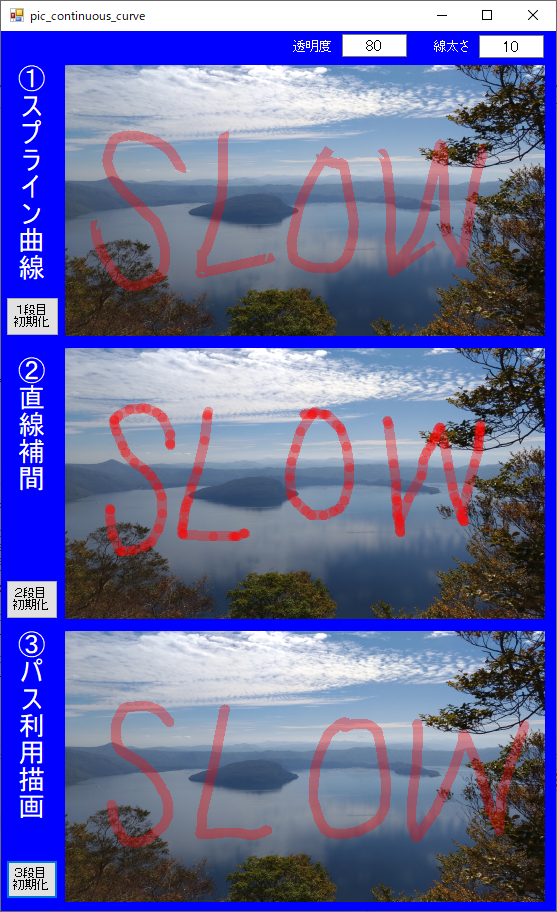
| 3方式の比較 |
①スプライン方式(DrawCurveメソッド)
マウスイベントを使って描画すると、開始点・終点・角部等で欠けや鋭いエッジや髭の様な形状が発生します。Graphics.DrawCurveメソッドを使い、「滑らかさ」として 0~1 のパラメータを設定できますが、多少改善されても、完全な解決は出来ませんでした。
②直線補間方式
マウスムーブイベントで連続的に発生する通過点を直線補間する方法です。下記の通り各直線両端とつなぎ目を“Round”指定し、外観上曲線に近づけます。
Pen.EndCap = System.Drawing.Drawing2D.LineCap.Round;
Pen.StartCap = System.Drawing.Drawing2D.LineCap.Round;
Pen.LineJoin = System.Drawing.Drawing2D.LineJoin.Round;
不透明時は、③パス利用描画と違いはありません。
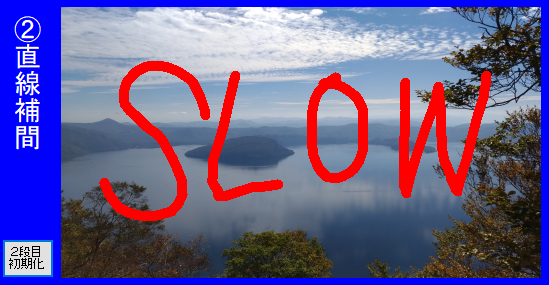
但し、透明設定した場合、下図の通り直線の接続箇所で線が重なり、色が濃くなってしまいます。

③パス利用描画方式
パス利用描画方式では、②直線補間方式で透明設定した場合に発生する直線接続部での重なりによる色の濃度差は発生しません。複数の直線から成るパスを形成後、パス全体を描画する為です。
| 評価プログラム |
評価プログラムを残しておきます。
using System;
using System.Collections.Generic;
using System.ComponentModel;
using System.Data;
using System.Drawing;
using System.Drawing.Drawing2D;
using System.Linq;
using System.Text;
using System.Threading.Tasks;
using System.Windows.Forms;

namespace ListViewTest
{
    public partial class Frm_02 : Form
    {
        bool draw_flag = false;
        int color_trans;
        int line_wdth;
        List<Point> points = new List<Point>();

        public Frm_02()
        {
            InitializeComponent();
        }

        private void Frm_02_Load(object sender, EventArgs e)
        {
            pictureBox1.SizeMode = PictureBoxSizeMode.StretchImage;

            pictureBox1.ImageLocation = @"";

            pictureBox4.SizeMode = PictureBoxSizeMode.StretchImage;
            pictureBox4.ImageLocation = pictureBox1.ImageLocation;

            pictureBox7.SizeMode = PictureBoxSizeMode.StretchImage;
            pictureBox7.ImageLocation = pictureBox1.ImageLocation;

            pict01_init();
            pict04_init();
            pict07_init();

        }

        private void pict01_init() {
            // 親pictureBox対し、透明化する処理
            pictureBox2.Parent = pictureBox1;
            pictureBox2.BackColor = Color.Transparent;

            // 元のParent(Form)に対する座標を補正する
            pictureBox2.Location = new Point(pictureBox2.Location.X - pictureBox1.Location.X, pictureBox2.Location.Y - pictureBox1.Location.Y);
            pictureBox2.Size = pictureBox1.Size;

            // 親pictureBox対し、透明化する処理
            pictureBox3.Parent = pictureBox2;
            pictureBox3.BackColor = Color.Transparent;

            // 元のParent(Form)に対する座標を補正する
            pictureBox3.Location = new Point(pictureBox3.Location.X - pictureBox1.Location.X, pictureBox3.Location.Y - pictureBox1.Location.Y);
            pictureBox3.Size = pictureBox2.Size;
        }

        private void pict04_init()
        {
            // 親pictureBox対し、透明化する処理
            pictureBox5.Parent = pictureBox4;
            pictureBox5.BackColor = Color.Transparent;

            // 元のParent(Form)に対する座標を補正する
            pictureBox5.Location = new Point(pictureBox5.Location.X - pictureBox4.Location.X, pictureBox5.Location.Y - pictureBox4.Location.Y);
            pictureBox5.Size = pictureBox4.Size;

            // 親pictureBox対し、透明化する処理
            pictureBox6.Parent = pictureBox5;
            pictureBox6.BackColor = Color.Transparent;

            // 元のParent(Form)に対する座標を補正する
            pictureBox6.Location = new Point(pictureBox6.Location.X - pictureBox4.Location.X, pictureBox6.Location.Y - pictureBox4.Location.Y);
            pictureBox6.Size = pictureBox5.Size;
        }

        private void pict07_init()
        {
            // 親pictureBox対し、透明化する処理
            pictureBox8.Parent = pictureBox7;
            pictureBox8.BackColor = Color.Transparent;

            // 元のParent(Form)に対する座標を補正する
            pictureBox8.Location = new Point(pictureBox8.Location.X - pictureBox7.Location.X, pictureBox8.Location.Y - pictureBox7.Location.Y);
            pictureBox8.Size = pictureBox7.Size;

            // 親pictureBox対し、透明化する処理
            pictureBox9.Parent = pictureBox8;
            pictureBox9.BackColor = Color.Transparent;

            // 元のParent(Form)に対する座標を補正する
            pictureBox9.Location = new Point(pictureBox9.Location.X - pictureBox7.Location.X, pictureBox9.Location.Y - pictureBox7.Location.Y);
            pictureBox9.Size = pictureBox8.Size;
        }


        // ◆◆◆◆◆◆◆◆◆◆◆◆◆◆◆◆◆◆◆
        // 1段目:DrawCurveで描画
        // ◆◆◆◆◆◆◆◆◆◆◆◆◆◆◆◆◆◆◆
        private void button1_Click(object sender, EventArgs e)
        {
            pictureBox2.Image = null;
        }

        private void pictureBox3_MouseDown(object sender, MouseEventArgs e)
        {
            draw_flag = true;
            color_trans = int.Parse(textBox1.Text);
            line_wdth = int.Parse(textBox2.Text);
            points.Add(new Point(e.X, e.Y));
        }

        private void pictureBox3_MouseMove(object sender, MouseEventArgs e)
        {
            if (!draw_flag) { return; };

            points.Add(new Point(e.X, e.Y));

            Bitmap tmp_cvs = new Bitmap(pictureBox3.Width, pictureBox3.Height);
            Graphics tmp_g = Graphics.FromImage(tmp_cvs);

            Pen tmp_p = new Pen(Color.FromArgb(color_trans, 255, 0, 0), line_wdth);

            Point[] pa = points.ToArray();
            if (pa.Length > 2)
            {
                tmp_g.DrawCurve(tmp_p, pa, 0.3F);
            }

            tmp_p.Dispose();
            tmp_g.Dispose();

            pictureBox3.Image = tmp_cvs;
        }

        private void pictureBox3_MouseUp(object sender, MouseEventArgs e)
        {
            if (!draw_flag) { return; };

            points.Add(new Point(e.X, e.Y));
            Point[] pa = points.ToArray();

            if (pa.Length < 3) { return; }

            pictureBox3.Image = null;

            Bitmap tmp_cvs = new Bitmap(pictureBox2.Width, pictureBox2.Height);
            Graphics tmp_g = Graphics.FromImage(tmp_cvs);

            Image img = pictureBox2.Image;
            if (img != null) { tmp_g.DrawImage(img, 0, 0, img.Width, img.Height); }

            Pen tmp_p = new Pen(Color.FromArgb(color_trans, 255, 0, 0), line_wdth);
            tmp_g.DrawCurve(tmp_p, pa, 0.3F);


            tmp_p.Dispose();
            tmp_g.Dispose();

            pictureBox2.Image = tmp_cvs;

            points.Clear();
            draw_flag = false;

        }


        // ◆◆◆◆◆◆◆◆◆◆◆◆◆◆◆◆◆◆◆
        // 2段目:直線を繋ぎ合わせて描画
        // ◆◆◆◆◆◆◆◆◆◆◆◆◆◆◆◆◆◆◆
        private void button2_Click(object sender, EventArgs e)
        {
            pictureBox5.Image = null;
        }

        private void pictureBox6_MouseDown(object sender, MouseEventArgs e)
        {
            draw_flag = true;
            color_trans = int.Parse(textBox1.Text);
            line_wdth = int.Parse(textBox2.Text);
            points.Add(new Point(e.X, e.Y));
        }

        private void pictureBox6_MouseMove(object sender, MouseEventArgs e)
        {
            if (!draw_flag) { return; }

            points.Add(new Point(e.X, e.Y));
            Point[] pa = points.ToArray();

            if (pa.Length < 3){ return; }

            Bitmap tmp_cvs = new Bitmap(pictureBox6.Width, pictureBox6.Height);
            Graphics tmp_g = Graphics.FromImage(tmp_cvs);

            Pen tmp_p = new Pen(Color.FromArgb(color_trans, 255, 0, 0), line_wdth);
            tmp_p.EndCap = System.Drawing.Drawing2D.LineCap.Round;
            tmp_p.StartCap = System.Drawing.Drawing2D.LineCap.Round;
            tmp_p.LineJoin = System.Drawing.Drawing2D.LineJoin.Round;

            for (int i = 0; i < pa.Length; i++)
            {
                //tmp_g.FillEllipse( tmp_b , pa[i].X - tmp_p.Width/2 , pa[i].Y - tmp_p.Width / 2 , tmp_p.Width , tmp_p.Width );
                if (i > 0)
                {
                    tmp_g.DrawLine(tmp_p, pa[i-1].X, pa[i-1].Y, pa[i].X, pa[i].Y);
                }
            }

            tmp_p.Dispose();
            tmp_g.Dispose();

            pictureBox6.Image = tmp_cvs;

        }

        private void pictureBox6_MouseUp(object sender, MouseEventArgs e)
        {
            if (!draw_flag) { return; };

            points.Add(new Point(e.X, e.Y));
            Point[] pa = points.ToArray();

            if (pa.Length < 3) { return; }

            pictureBox6.Image = null;

            Bitmap tmp_cvs = new Bitmap(pictureBox5.Width, pictureBox5.Height);
            Graphics tmp_g = Graphics.FromImage(tmp_cvs);

            Image img = pictureBox5.Image;
            if (img != null) { tmp_g.DrawImage(img, 0, 0, img.Width, img.Height); }

            Pen tmp_p = new Pen(Color.FromArgb(color_trans, 255, 0, 0), line_wdth);
            tmp_p.EndCap = System.Drawing.Drawing2D.LineCap.Round;
            tmp_p.StartCap = System.Drawing.Drawing2D.LineCap.Round;
            tmp_p.LineJoin = System.Drawing.Drawing2D.LineJoin.Round;

            //SolidBrush tmp_b = new SolidBrush(Color.FromArgb(color_trans, 255, 0, 0));

            for (int i = 0; i < pa.Length; i++)
            {
                //tmp_g.FillEllipse(tmp_b, pa[i].X - tmp_p.Width / 2, pa[i].Y - tmp_p.Width / 2, tmp_p.Width, tmp_p.Width);
                if (i > 0)
                {
                    tmp_g.DrawLine(tmp_p, pa[i - 1].X, pa[i - 1].Y, pa[i].X, pa[i].Y);
                }
            }

            tmp_p.Dispose();
            tmp_g.Dispose();

            pictureBox5.Image = tmp_cvs;

            points.Clear();
            draw_flag = false;
        }


        // ◆◆◆◆◆◆◆◆◆◆◆◆◆◆◆◆◆◆◆
        // 3段目:パスを使って描画
        // ◆◆◆◆◆◆◆◆◆◆◆◆◆◆◆◆◆◆◆
        private void button3_Click(object sender, EventArgs e)
        {
            pictureBox8.Image = null;
        }

        private void pictureBox9_MouseDown(object sender, MouseEventArgs e)
        {
            draw_flag = true;
            color_trans = int.Parse(textBox1.Text);
            line_wdth = int.Parse(textBox2.Text);
            points.Add(new Point(e.X, e.Y));
        }

        private void pictureBox9_MouseMove(object sender, MouseEventArgs e)
        {
            if (!draw_flag) { return; }

            points.Add(new Point(e.X, e.Y));
            Point[] pa = points.ToArray();

            if (pa.Length < 3) { return; }

            Bitmap tmp_cvs = new Bitmap(pictureBox9.Width, pictureBox9.Height);
            Graphics tmp_g = Graphics.FromImage(tmp_cvs);
            GraphicsPath tmp_pth = new GraphicsPath();

            Pen tmp_p = new Pen(Color.FromArgb(color_trans, 255, 0, 0), line_wdth);

            tmp_p.EndCap = System.Drawing.Drawing2D.LineCap.Round;
            tmp_p.StartCap = System.Drawing.Drawing2D.LineCap.Round;
            tmp_p.LineJoin = System.Drawing.Drawing2D.LineJoin.Round;

            for (int i = 0; i < pa.Length; i++)
            {
                if (i == 0){ tmp_pth.StartFigure();
                }else if (i > 0){
                    tmp_pth.AddLine( pa[i - 1].X, pa[i - 1].Y, pa[i].X, pa[i].Y);
                }
            }

            //tmp_pth.CloseFigure();

            tmp_g.DrawPath(tmp_p,tmp_pth);

            tmp_p.Dispose();
            tmp_g.Dispose();

            pictureBox9.Image = tmp_cvs;
        }
        private void pictureBox9_MouseUp(object sender, MouseEventArgs e)
        {
            if (!draw_flag) { return; };

            points.Add(new Point(e.X, e.Y));
            Point[] pa = points.ToArray();

            if (pa.Length < 3) { return; }

            pictureBox9.Image = null;

            Bitmap tmp_cvs = new Bitmap(pictureBox8.Width, pictureBox8.Height);
            Graphics tmp_g = Graphics.FromImage(tmp_cvs);
            GraphicsPath tmp_pth = new GraphicsPath();

            Image img = pictureBox8.Image;
            if (img != null) { tmp_g.DrawImage(img, 0, 0, img.Width, img.Height); }

            Pen tmp_p = new Pen(Color.FromArgb(color_trans, 255, 0, 0), line_wdth);
            tmp_p.EndCap = System.Drawing.Drawing2D.LineCap.Round;
            tmp_p.StartCap = System.Drawing.Drawing2D.LineCap.Round;
            tmp_p.LineJoin = System.Drawing.Drawing2D.LineJoin.Round;


            for (int i = 0; i < pa.Length; i++)
            {
                if (i == 0)
                {
                    tmp_pth.StartFigure();
                }
                else if (i > 0)
                {
                    tmp_pth.AddLine(pa[i - 1].X, pa[i - 1].Y, pa[i].X, pa[i].Y);
                }
            }

            //tmp_pth.CloseFigure();

            tmp_g.DrawPath(tmp_p, tmp_pth);

            tmp_p.Dispose();
            tmp_g.Dispose();

            pictureBox8.Image = tmp_cvs;
            points.Clear();
            draw_flag = false;
        }

        private void pictureBox9_Click(object sender, EventArgs e)
        {

        }
    }
}
| まとめ |
写真にちょっとしたマーキングする程度であれば、パス利用描画方式で十分(?)かなと思っています。
次回は写真の拡大表示について検討する予定です。